Board of Intermediate and Secondary Education Peshawar ICS Cha 1 Introduction to computer system Notes Short Questions, Long Questions, & Mcqs Pdf Download free.
Introduction to computer system BISEP
What is a Computer?
Computer Definition:
“A computer is an electronic device that accepts input data and instructions with the help of input devices, stores them until needed, processes it, and then produces the output as a result with the help of output devices.”
The computer is composed of several components used to perform different functions.
These are:
a. Input devices: Used for giving input data to computers. For example mouse, keyboard, etc.
b. Output devices: Used to give the output of that input given by the user. For example, monitor, printer, etc.
c. CPU: Used for processing data instruction to produce required results.
d. Primary Storage device: Stores data temporarily while processing instructions i.e. RAM.
e. Secondary Storage devices: Stores data permanently in the memory of a computer, i.e. hard disk.
f. Communication devices: Used for communicating with users
What is the processing operation?

Processing Operation
It is the essential operation of a computer. The processing operation is the transformation process to convert the input into output. The Central Processing Unit (CPU) processes the input and generates the required output. In order to process this input, the CPU stores instructions in the computer’s memory. From computer memory, all instructions and programs are directly accessible for processing.
It consists of three parts:
Control Unit (CU) directs all of the processor operations
The arithmetic Logic Unit (ALU) performs the arithmetic, logic, and decision operations.
Main Memory is the working area of a computer.
Show basic operations of a computer with the help of a block diagram.

The block diagram of basic operations is as follows:
The above figure shows the block diagram of basic operations. The block diagram includes:
Storage operation: It is related to storing instructions or programs in computer Secondary or Primary storage.
Input operation: It relates to giving input to the computer through primary storage.
Output operation: It is to get the output of processed instruction.
Processing operation: It is the processing or manipulation of input to generate its output.
What is a notebook computer?
Notebook Computer:
A notebook computer is one of the Microcomputers. It is designed to be used for mobile computing. It has all features that mobile users require for work. This is easy to use. It is smaller in size so it is transported easily. These can be used such as on airplanes etc.
State five differences between hardware and software.
The differences between hardware and software are as follows:
| Headings | Hardware | Software |
| Definition | The physical components of the computer are called hardware. | Non-physical components of a computer and the collection of instructions that enable a user to interact with the computer are called software. |
| Types | Input, storage, processing, control, and output devices. | System software, Programming software, and Application software. |
| Function | The computer is hardware, which operates under the control of software. | The operations of the computer are controlled through software. |
| Viruses | Hardware is not affected by computer viruses. | The software is affected by computer viruses. |
| Examples | CD-ROM, monitor, printer, video card, scanners, label makers, routers, and modems. | Adobe Acrobat, Internet Explorer, Microsoft Word, Microsoft Excel, etc. |
Differentiate between an Interpreter and a compiler.
The differences between interpreter and compiler are as follows:
| Headings | Compiler | Interpreter |
| Input | The compiler takes the entire program as input. | The interpreter takes single instruction as input. |
| Intermediate object Code | Intermediate object code is generated. | No Intermediate object code is generated. |
| Control statements | Conditional Control Statements execute faster. | Conditional Control Statements execute slower. |
| Memory requirement | Memory requirement is more. | Its memory requirement is less. |
| Errors display | Errors are displayed after the entire program is checked. | Errors are displayed for every instruction interpreted. |
| Examples | C language has a compiler. | Visual Basic has an interpreter. |
How Application software helps Users?
Application software is a type of software that is used for performing a number of different tasks. It helps users to solve real-world problems. Some of the software that is used for helping users are as follows:
Enterprise software is used to satisfy the needs of organizations rather than individual customers.
Accounting software is used to process and record accounting transactions.
Office suites are a set of business applications with the same style of user interface.
Graphics software is used to manipulate and edit images.
Media players are used to playing audio and video or animation files on a computer.
Read more: Swat Board Computer Science Notes Cha 1
Differentiate between shareware and freeware.
The differences between shareware and freeware are as follows:
| Headings | Shareware | freeware |
| Definition | The software that gives users a chance to try the software before buying is called shareware. | The software that anyone can download from the internet and use for free is called freeware. |
| License and copyright | Copyright laws apply to shareware. | Freeware has a proper license or ends user agreement. |
| Features | Most of the time all features are not available in the trial version or have limited use. To use all features, one has to purchase the software. | All features are used for free. |
| Distribution | Shareware may or may not be distributed freely. Most of the time author’s permission is needed to distribute the shareware. | Freeware programs can be distributed free of cost. |
| Example | Winzip etc. | Adobe PDF, Google Talk, etc. |
What is Licensed Software?
A software license is a permission or agreement that provides legal binding for the use and distribution of the software.
Licensed software is therefore a type of software that uses a license to transfer the rights of using software to the user. It has some restrictions for software modification, further distribution, re-building, etc. Some examples of this software are:
- Microsoft Windows
- Adobe Flash Player
- Adobe Photoshop
- Winzip etc.
A license agreement usually limits the ways we use the software. We cannot copy it, alter it or redistribute it. We don’t have access to the underlying source code. License software commonly uses different terms. These include:
Freeware: It is a licensed downloadable small utility. We don’t have the right to view the source code and also we cannot copy or redistribute the software.
Shareware: This software is also known as Trial software that we can use it free of charge for a limited time. After that, we are expected to pay to continue using it.
Q.10) What is firmware?
Firmware is a software program or set of instructions programmed on a hardware device. It provides the necessary instructions for how the device communicates with the other computer hardware. These instructions are written in machine languages and permanently embedded in the hardware. Examples of the hardware devices including firmware are:
- ROM
- Mobile phones
- Digital cameras
- Toys etc.
ICS Group Computer Science Extensive Questions
Q.3) Give detailed answers to the following questions.
i) What are computing devices? Explain early and modern computing devices.
Answer:
Computing devices can be defined as:
“ The devices used to perform calculations are called computing devices.”
These calculations can be simple or they can be complex. The fastest computer device is a computer. It can perform or help to perform calculations.
Computing devices can be classified as:
- Early computing devices
- Modern computing devices.
Early computing devices:
Earlier computing devices that were developed for the purpose of calculation are as follows:
- Abacus: It was introduced about 5000 years ago. It was considered the first computer. Abacus uses a system of sliding beads arranged on a rack.
- Leibniz calculator: It was created by a German mathematician and philosopher, Gottfried Von Leibniz in 1964. It was a computing device used for addition, subtraction and multiplication by using the system of gears and dials
- A difference engine: It was created in 1822 by Charles Babbage. It was designed for solving differential equations. This machine was the beginning of real computers.
- Tabulating machine: Tabulating machine was developed in 1989 by Herman Holirath for computing the U.S. census.
- Z3: Z3 was created by german engineer Konard for designing aircraft and missiles.
- Mark I: it was an electronic computer developed by IBM in 1944. It was an electronic relay computer. It uses electromagnetic signals to solve basic arithmetic as well as complex equations.
- ENIAC (Electronic Numerical Integrator and Computer): It was the first general-purpose computer developed by John Presper Eckert and John W. Mauchly. It was 1000 times faster than MARK I
- EDVAC( Electronic Discrete Variable Automatic Computer): It was the first computer that held memory. It was developed in 1945 by Von Neumann.
- UNIVAC-I: It was the first commercial computer built by Remington Rand in 1951.
Modern Computing Devices:
Early computing devices mostly used Vacuum tubes, due to which the speed of computers was slow and their size was also large. Then in 1948, they were replaced by transistors which enhances the speed of computer systems and lessened their sizes as well.
In 1951, Integrated Circuit chips(ICs) were introduced. This was the real revolution in the computing industry. These small chips increased the performance of computers and modern computing devices came into being.
Some of the devices that were created in the era of modern computing devices are as follows:
- IBM 1401: It was first universally accepted throughout the industry.
- Intel 4004: It was the chip developed in 1971. This chip locates all components of a computer system on a single chip. i.e. CPU, memory, input, and output controls.
- Personal Computer(PC): In 1981 PC was introduced by IBM to use in homes, offices, and schools.
Further, computing devices are getting faster, and the trend toward a smaller size. Now, we have a number of modern computing devices like laptops, notebook computers, etc.
ii) Explain different classifications of computers.
Classification of computers:
Computers are classified on the basis of physical size, performance and application areas. Generally, computers are classified as:
– Microcomputers
– Mainframe
– Supercomputers
All of these are explained as under:
1) Microcomputers:
Microcomputers are also known as Personal Computers (PC’s). It is the least expensive computer. These are originally designed for individual users but nowadays they are also used in businesses and several other places.
Types:
Microcomputers have the following types:
I. Desktop computers
II. Notebook computers
III. Laptop computers
IV. Handheld computers
V. Mobile computers
All of these are explained as follows:
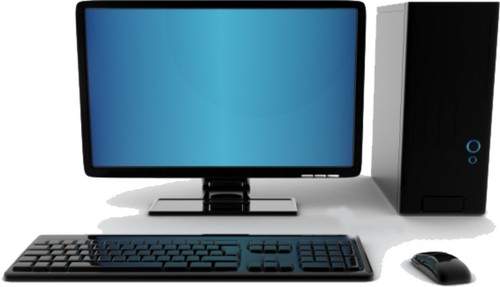
Figure: Desktop Computer
- Desktop computers:
It is the most common type of microcomputer. This type of computer is equally used in the home, office, educational institutes, etc. They vary in size and style. Their speed depends on the CPU and other internal hardware components they are using.
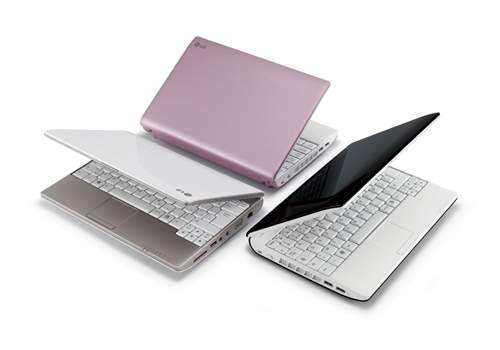
Figure: Notebook computer
- Notebook computers:
A notebook computer is one of the Microcomputers. It is designed to be used for mobile computing. It has all the features that mobile users require for work. This is easy to use. It is smaller in size so it is transported easily. These can be used such as on airplanes etc.
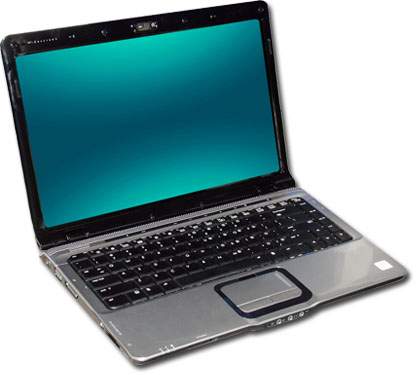
Figure: Laptop Computers
- Laptop computers:
A laptop computer is a portable device. We can take it anywhere we want. They are lightweight and easy to carry. Also, their speed is very fast. One more advantage of laptop computers is that they do not need a continuous power supply. Once they are charged, they can be used for a couple of hours on the power of the battery. The figure below shows a laptop computer.
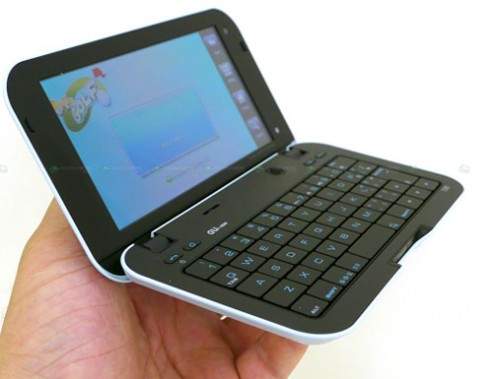
Figure: Handheld computer
- Handheld computers:
These computers are very lightweight and can even be taken on the top of the palm. So they are also called Palmtop computers. They are portable computers. The most common type of these computers used nowadays are smartphones. The figure below shows a handheld computer.
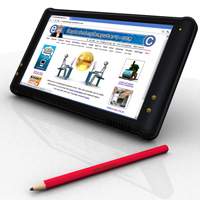
- Mobile computers:
A mobile computer is a small computing device. These include laptops, smartphones, PDA,s and tablet PC’s. Some of them are small enough to be handheld. It has a display screen with touch input. These devices can receive and send signals through a receptor device. All of these devices work in a full duplex mode. Full duplex means that these can send and receive signals at the same time.
Mobile computers have an operating system that can run various types of application software known as apps.
These devices provide mobility to users. It means that they are not bound to sit or stay in one place for using computers. They can move and go everywhere and use mobile computers because the mobile computer’s one of the basic feature is that they provide wireless communication. The figure shows the mobile computer:
2) Mainframe computers:
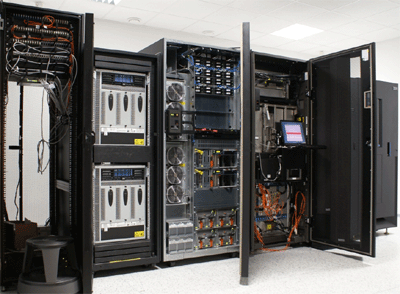
Mainframe computers are more expensive than desktop computers. They are used by large organizations for some critical applications, such as for census, industry and customer statistics, enterprise resource planning, and financial transaction processing.
These computers are large in size and also more powerful than desktop computers. They have a large memory to store a large amount of data. Their speed is in Billion per second(BIPS). Mainframe systems are mostly used as super servers in large client-server networks. These are also used for high-volume websites. These are used by Airline companies for ticketing and reservations. Government departments, banks, and insurance companies also use this.
An automated Teller Machine (ATM) is also an example of a mainframe system.
3) Supercomputers:
Supercomputers are the most powerful, most expensive, and huge in size. These are specially designed for scientific, engineering, and business applications. Their speed is in billions or trillions of instructions per second.
They are used for weather forecasting, weapon research, stock analysis, automobile designing, etc. They have a large memory space to store data. Their memory speed is also higher than other types of computers.
One of the examples of a supercomputer is Sequoia, which is IBM’s supercomputer placed at NASA. It can perform 16 thousand trillion instructions per second. The below figure shows this supercomputer.
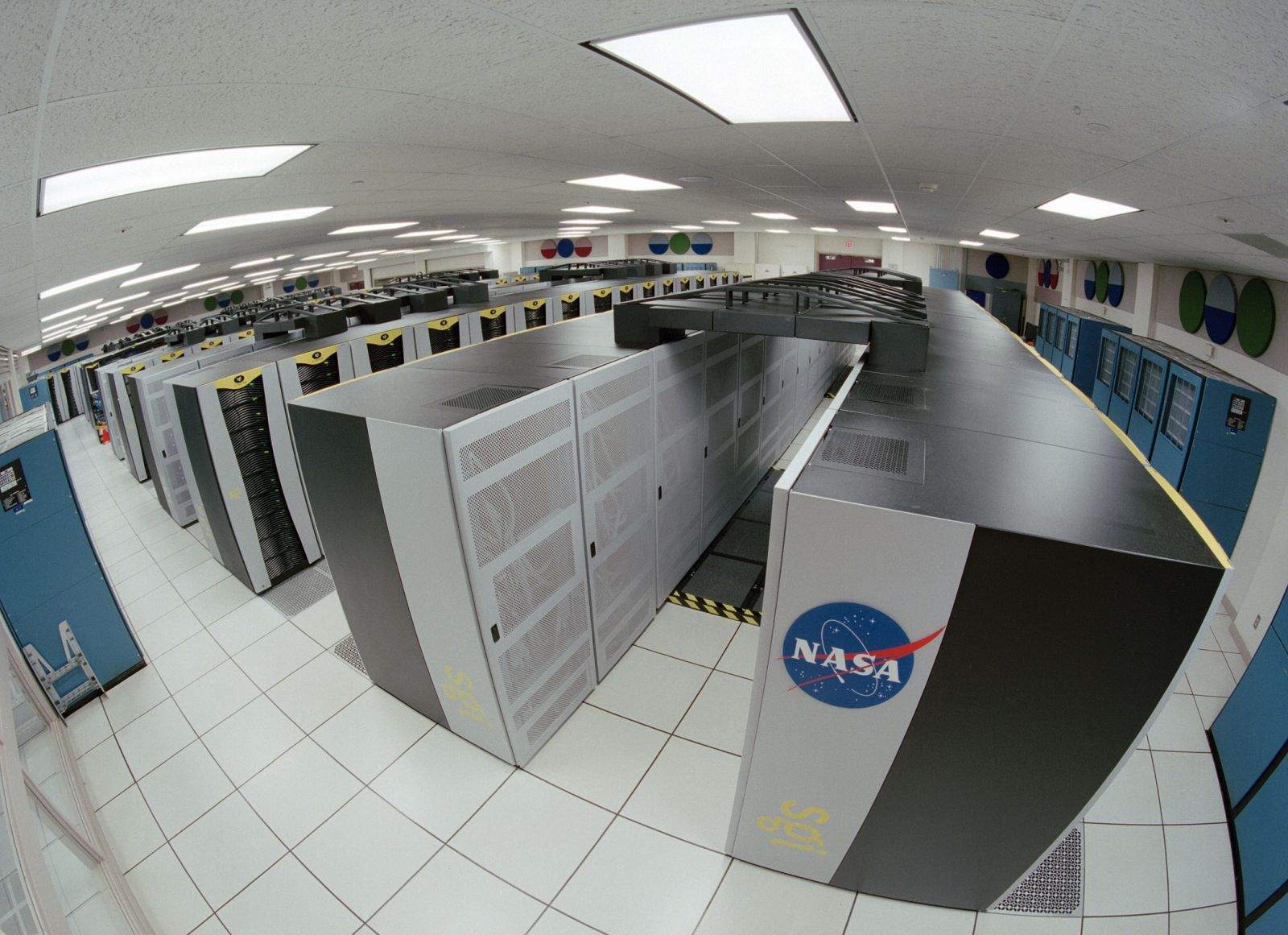
Figure: Supercomputer at NASA
iii) What is software? Explain its two main types with examples.
Answer:
Software:
Software is defined as:
“The set of instructions which directs the computer how to do a specific work.”
We cannot touch and feel software like hardware. It provides communication between computer and user. These instructions are written in a specific computer language which is understandable for computer hardware.
Types of Software:
The computer software is divided into two main types:
– System software
– Application software
1) System software:
System software is a collection of one or more programs used to control and coordinate the hardware and other application software. Generally, the system software may perform the following functions:
- Communicates with hardware devices. Controls and monitors the proper use of various hardware resources like CPU, memory, peripheral devices like monitor, printer, etc.
- Supports the execution and development of other application software.
Examples of system software:
Some of the examples of system software are:
- Operating system
- Programming language translators
- Device drivers
- Antivirus etc.
2) Application software:
Application software is a collection of one or more programs used to solve a specific task. It is not limited to one specific function. It is helpful to solve many problems. Generally, it is used in the banking industry, airline reservations,s and many other fields.
Example of application software:
Some of the examples of application software are:
- Word processing software
- Spreadsheet software
- Education software
- Entertainment Software
- CAD software etc.
iv) Explain different types of General Purpose Application Software
Answer:
Application software:
Application software is a collection of one or more programs used to solve a specific task. It is not limited to one specific function. It is helpful to solve many problems. Generally, it is used in the banking industry, airline reservations,s and many other fields.
General purpose application software:
General purpose application software is a type of application that can be used for a variety of tasks. It is not limited to one particular function. These are called packages of commercial software. These are divided into the following main categories:
i. Productivity Software
ii. Business Software
iii. Entertainment software
iv. Education software
Types of general purpose application software:
i. Productivity software:
It is the type of application software that makes people more efficient and effective in their daily activities. This software is becoming more popular and more in demand to learn for employment. Some common types of productivity software are:
- Database software: A database is a system that collects data and allows access, retrieval, and use of the data. Data is stored in tables, which consist of rows and columns. This software allows users to create databases. This also allows manipulating and updating data stored in the database. MS Access, MySQL, and Oracle are examples of this software.
- Multimedia software: This software is used to play audio and video media files. This type of software includes Real players, Media player,s etc
- Word processor: Word processing is widely used to create or edit a typed document. In this program, we can change the format of your work like color, text size, etc. Some of the common word processors include Notepad, WordPad, and MS Word.
- Spreadsheet software: A spreadsheet is used to organize data in rows and columns in a worksheet. Data is stored in cells that are divided into columns and rows. More than 15 million cells can hold data. MS-Excel and Lotus 1-2-3 are common examples of spreadsheet software.
- Presentation Software: Presentation software enables users to create slides and make on-screen presentations, reports, and slideshows. In slides, we can merge text, graphics, audio and video files, etc. MS-PowerPoint is a common example of presentation software.
ii. Business software:
It is any software that is used by business users to perform various business functions. The term is often used more specifically for software that helps a business to accomplish specific goals through the applied principles that the software supports. Some business software includes:
- Marketing software
- Payroll software
- Inventory control system
- Communication software
- Accounting software
iii. Entertainment software:
Entertainment software is an entertainment tool for users. They can play any kind of media files i.e. audio, video, etc. using them. Game software is also available. Some examples of entertainment software are:
- Media player
- Video games
iv. Educational software:
Application software is also helpful for education purposes. They allow computers to be used as teaching as well as learning tools for students. The software that is helpful for educational purposes is:
- Computer Based Training (CBT): CBT is used for training purposes. This training software has many types and is used in many fields. For example, Flight simulation CBT is used for the training of pilots. It guides them on how to fly an aircraft. Some CBTs are also designed for the training of doctors, engineers, etc.
- Encyclopedia: Encyclopedia software is like a dictionary but it gives a complete guide to speaking and using a word correctly and also provides complete information and knowledge of the particular word.
- Computer Aided Learning (CAL): CAL software provides a wide range of computer software that provides education in an interactive way. These are designed for a variety of subjects. CAL is not only useful for students but teachers can also take help from this type of software to develop a better understanding of their lectures. This software might include:
- Presentation software
- Online tools for different subjects.
v) Write a short note on any five input devices.
Input devices:
Input devices are hardware components of computer systems. These are used to give enter data or different instructions to computer memory.
Types:
There are many types of input devices. Some of them are:
- 1. Keyboard
- 2. Mouse
- 3. Joystick
- 4. Light pen
- 5. Scanner
All of these input devices are explained as follows:
1) Keyboard:
It is an input device through which input is given to a computer by pressing its keys. It looks like the keypad of a typewriter but it has some additional keys. The keys a normal keyboard includes are:
– Numeric
– Alphabetic
– Alphanumeric
– Function
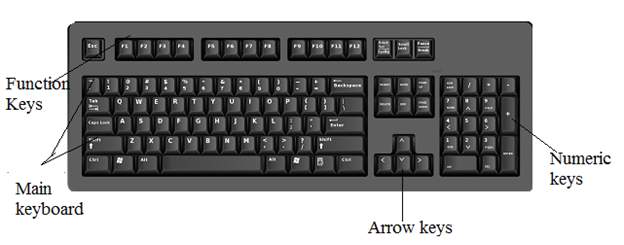
Figure: Keyboard
The standard keyboard contains 101 keys. This is also called a QWERTY keyboard because of the top row of alphabetic keys.
Keyboard Segments:
It has four segments:
- – Main keyboard
- – Numeric keys
- – Cursor control keys (Arrow keys)
- – Function keys
- Main Keyboard:
The main keyboard includes almost similar keys as the typewriter keypad but it has some special command keys. The working of command keys depends on the software being used. Some of the most common keys are:
– Alphabetic keys
– The Escape key(Esc)
– Caps Lock
– Shift
– Ctrl
– Alt
– Backspace
– Enter - Numeric keys:
Numeric keys serve one of the two purposes, depending upon the status of Num lock (Num Lock) mode. When the computer is in NumLock mode, numbers can be entered by pressing these keys and mathematical symbols. When NumLock is off then keys of 2,4,6,8 can be used to control cursor movement. - Cursor Control Keys:
Cursor control keys are located on the left of the numeric keys. These are also called Arrow keys and are used to move the cursor position. It is the set of four arrow keys, which move the cursor up, down, left, and right. - Function keys:
Function keys are the special purpose keys located on the top row of the keyboard. These are 12 in number, labeled as F1, F2, F3, F4, F5, F6, F7, F8, F9, F10, F11, and F12. These keys are an easy way to give commands to the computer. They have different functions in different programs, particularly in application programs.
2) Mouse:
The Pointing input device that controls cursor movement is called Mouse. It has a ball on its underside that is rolled on a flat surface or mouse pad. The rolling movement causes a corresponding cursor movement on the screen. It has two buttons Left and Right click and one scroll wheel between those buttons.
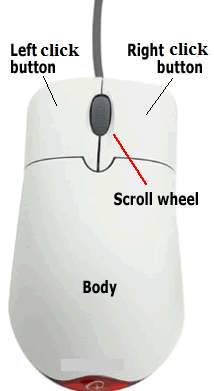
Figure: Mouse
Functions of the mouse:
1. A computer mouse enables its user to move a cursor smoothly and intuitively.
2. It is essential for dragging, selecting, hovering, and clicking.
3. It allows users to switch between applications, select options and
4. It moves objects around the screen with a great degree of accuracy and fluidity.
5. It is used to move between and select links on a website, buttons on an options screen, and entries on the menu.
Examples of mouse use:
Best example of mouse use is an image editing program. Image-editing programs that require detailed selections and games where fine on-screen movements are necessary are two situations where a mouse can prove very useful. A mouse is a key peripheral in any program and the operating system itself, but it is essential for such creative applications as image, video, and music editing; it’s also standard equipment for many games titles, desktop publishing, and presentation software.
3) Joystick:
A joystick is an input device consisting of a stick that pivots on a base and reports its angle or direction to the device it is controlling. It allows a user to control a character or machine in a computer program such as a plane in a flight simulator.
It looks like a device used for controlling arcade games but it includes some extra buttons for additional functionality.
Joystick was invented in 1926. It was originally designed for remotely piloted aircraft.
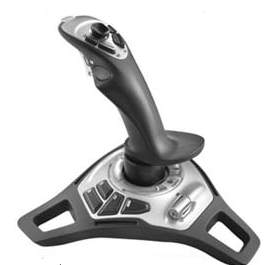
Figure : Joystick
Computer joystick ports:
Nowadays computer joysticks connect to the computer using a USB port. Here are the computer ports that accept a joystick:
- Bluetooth
- Game port
- Serial port
- USB
4) Light Pen:
A light pen is a light sensitive pointing device commonly used to select or otherwise modify text or data on a screen. It gives input in the form of a light-sensitive pointer used in conjunction with a computer CRT display. It allows the user to point the displayed objects or draw on the screen.
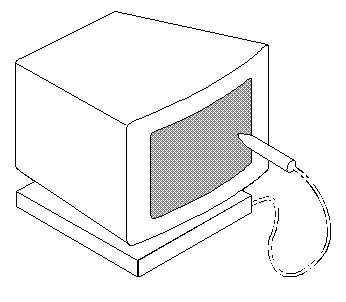
Figure: Light Pen
5) Scanner:
It is a source data entry device i.e. it directly gives input to the computer. It reads a preprinted material and converts it in a digital form. Scanners use different image sensors for this purpose. Some of the common types of scanners are as follows:
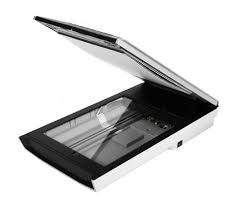
Figure: Flatbed Scanner
- Flatbed Scanner:
A flatbed scanner is made up of a glass pane and a moving optical image sensor array. The pane is illuminated with the help of bright light planted underneath it. The image which we want to scan is placed on the glass pane. The sensor or source of light moves across the glass pane to scan the document and to produce its digital copy.
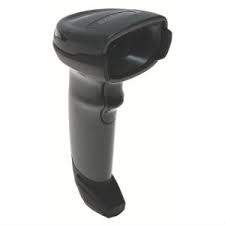
Figure: Handheld Scanner
- Hand held Scanner:
A hand-held scanner is a small manual scanning device which is moved over the object which is to be scanned. For example, if a document needs to be scanned, the hand held scanner has to be dragged over the scanner. Using a handheld scanner is slightly difficult as the hand has to be steady all the time. Little movement of the hand can lead to distortion of the image. One of the hand held scanners is the barcode scanner, typically used in departmental stores.
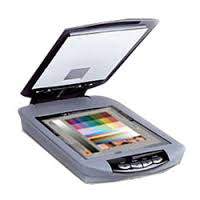
Figure: Optical Scanner
- Optical Scanner:
It is the type of scanner that uses optical light to read text or illustrations that are printed on paper and translate them in digital form. The resulting image is called bitmap. It can be stored in a file or can also be displayed on a screen.
vi) What is output? Briefly explain softcopy output devices.
Output:
Output is the result given by the computer hardware to the user which is generated after processing the input of the user. The device used to display the input given to the computer is called an output device. Output can be of two types:
- Softcopy output
- Hard copy output
Softcopy output:
It is the output that is shown on the display screen or is in audio or voice form. This output cannot be touched. The devices that generate soft copy output are as follows:
- Monitors
- Speakers etc.
Hardcopy output:
It is the output that is printed on the paper. This output can be touched. Some of the output devices which generate are hard copy output are listed below:
- Printer
- Plotters etc.
Soft copy Output devices:
The devices that generate soft copy output are called softcopy output devices. Some of these are:
- Monitor
- Speaker
Monitor:
A monitor is also called a visual display. It has a display screen for viewing images and it has a casing that holds it. It has different sizes and types.
Features of monitor:
It is distinguished on the basis of the following features:
- Size: Standard size of monitor is 15 to 19 inch. Its shape is like early TV sets but now modern monitors are different from that and have flat screens.
- Color: It can be either monochrome or color monitor (RGB colors).
- Resolution: The number of pixels or dots per square inch is called resolution. The image on your computer screen is built up from thousands or millions of pixels. The image on the screen is created by changing the colors of these tiny pixels. The screen resolution tells us how many pixels the screen displays horizontally and vertically. It is written as 1024 x 768. 1024 is the number of horizontal pixels and 768 is of vertical pixels.
- Refresh Rate: Refresh rate is the speed in which the monitor restores the screen per unit time.
- Dot pitch: Measure of the distance between each pixel on a color computer monitor is called dot pitch. It is expressed in millimeters (mm). Lower the dot pitch, sharper the displayed image.
Types of monitor:
Monitor is of two types:
- CRT(Cathode Ray Tube) monitor
- LCD monitor
1. CRT monitor:
A CRT monitor is like a television set. It uses the same CRT technology. The CRT monitor has two major parts;
- The screen: It is on the front of the monitor
- CRT: It is fitted inside the monitor.
2. LCD (Liquid Crystal Display ) monitors:
It is another modern type of monitor. LCD monitors do not use CRT technology. They have a flat lightweight surface filled with millions of tiny glass bubbles, each having a phosphorous covering. These phosphorous coverings glow to create an image. They are easily portable.
Speakers:
It is a hardware device which is connected to the computer’s sound card that gives the output of sound generated by the computer. Headphones are also used as an alternative to speakers. PC’s have separate speakers attached with them from outside but laptops come with integrated speakers.
vii) What is the importance of magnetic cards/devices based systems? Explain different types of magnetic cards
Answer:
Magnetic cards/ devices based systems:
Magnetic cards / devices are used in many fields and by many organizations. These are used by hotels, banks, credit card companies, for payments etc. They are very important in many aspects. Some of the common types of magnetics cards that are used on daily basis and also show the importance of magnetic cards are as follows:
i. Magnetic Ink Character Recognition (MICR).
ii. Magnetic Stripe Card
iii. Smart card
All of them are explained as under:
i. Magnetic Ink Character Recognition (MICR):
Characters written by special magnetic ink are read by MICR systems. These are mostly used in banks. Banks use this to read information from cheques and save them in their computer. Magnetic characters that are written on cheque and read by MICR system is shown in figure below:
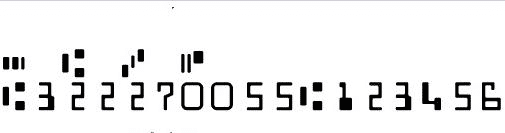
Figure: MICR
ii. Magnetic Stripe Card:
It is a type of card which stores data by modifying the magnetism of tiny-iron based magnetic particles on a band of magnetic material on the card. These cards are also called swipe cards. Credit cards are the best example of credit cards.
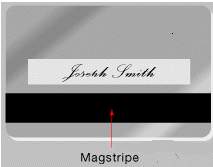
The stripe on the back of a credit card is a magnetic stripe often called a magstripe. The magstripe is made up of tiny iron-based magnetic particles in a plastic-like film. Each particle is really a very tiny bar magnet of an inch long. To read a card it is swiped through a Magnetic stripe reader, which efficiently reads the pattern of magnetic particles.
This information on a magstripe can be destroyed by scratching or by coming in contact with some liquid. Magstripe of credit card is shown in figure below:
viii) What are impact and non-impact printers? Explain any two types of printers in each category.
Answer:
Printer
Printer is the output device which is used to produce hardcopy output on paper.
Types:
Printers are divided into two categories:
– Impact printers
– Non-impact printers
1) Impact printers:
It is the type of printer that works by striking a head or needle against an ink ribbon to make a mark on the paper.
Characteristics:
Some of the characteristics of impact printers are as follows:
– Impact printers generate more noise while printing.
– Their speed is comparatively slow.
Types:
Following are types of impact printers:
– Dot matrix
– Drum printer
- Dot matrix printer:
Any printer that produces a character made up of dots using a wire pin printed head. The quality of output from a dot matrix printer depends largely on the number of dot matrices, which might be low enough to show individual dots. Dot matrix printers are often categorized by the number of pins in the printer head typically 9 or 24. - Drum printer:
Drum printer is a type of solid-font line printer. In these types of printers, a fixed font character is set. These character sets are engraved onto a number of print wheels. All these wheels combine to form a drum. This drum spins at high speed.
When the desired character arrives in a drum, the hammer strikes on it and prints it on a paper. A full set of hammers delivers (600 lines per minute) and a half set of hammers delivers (300 Lines Per Minute).
2) Non-impact printers
It is the type of printer that does not operate by striking the head against a ribbon.
Characteristics:
Some of the characteristics of non-impact printers are as follows:
– They are quieter than impact printers i.e. they generate less noise.
– Their speed is comparatively greater.
Types:
Some of the types of non-impact printers are as follows:
– Ink-jet printers
– LASER printers
- Ink-jet printer:
It is a kind of non-impact spray of small dots of electrically charged ink onto a paper to form images. A typical ink-jet printer has a resolution of 300 to 600 dots per inch (dpi). - LASER printer:
LASER printer is similar to a photocopying machine. A type of printer that utilizes a laser beam to produce an image on a drum. The light of the laser alters the electrical charge on the drum wherever it hits. The drum is then rolled through a reservoir of toner, which is picked up by the charged portions of the drum. Finally, the toner is transferred to the paper through a combination of heat and pressure. This is also the way copy machines work.
The laser printer produces high-quality images of both text and graphics ranging from 300 dpi to 12000 dpi. Its speed ranges from 4- 32 pages per minute for microcomputers and up to 200 pages per minute for mainframes.
ix) How is a plotter different from a printer? Explain different types of plotters.
Answer:
Plotter:
A plotter is an output device. It is used to produce hardcopies of high-quality graphics.
It is different from printerType in the aspect that the printer prints mostly documents and images on a small limited size of paper while plotters are used for specialized applications i.e. architectural drawings, maps, graphs and charts.
Types:
Plotters are of two basic kinds:
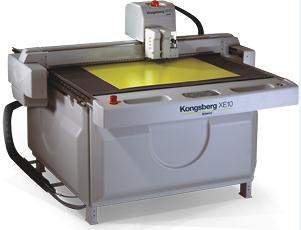
– Flatbed plotter
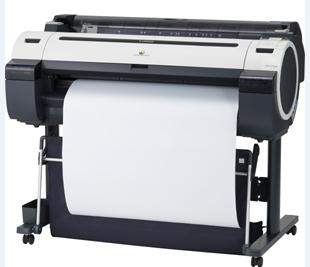
– Drum plotter
- Flatbed plotter:
In a flatbed plotter the sheet on which a plotter has to plot a design, is fixed over a rectangular flatbed table. In this type of plotters, all types of motions are provided by the pen holding mechanism, under the control of a computer. It is necessary to draw a design or graph. Most of the flatbed plotters have one or more pens of different colors and width.
- Drum plotter:
In drum plotter the sheet on which a plotter has to plot a design is placed over the drum, which can rotate in both clockwise and anticlockwise direction. In the drum plotter the pens are fixed on the drum. Pens move left and right to create the desired image on paper while rotating the drum. The advantage of using a drum plotter is that the length of the plot depends on the width of the drum. It’s almost unlimited.

